1.3.1. The re-registration: how and why#
Groups that are already registered must re-register each semester in order to maintain their status. This allows for regular checks to be made to ensure that the group still exists and that there have been no unnoticed changes to the contact persons, number of members, or statutes. Re-registration can be done online.
1.3.1.1. Deadlines for re-registration#
At the beginning of each semester, lists are created, mailing lists are updated, assigned university IDs are renewed, and the university guide is revised. For an optimal overview, we therefore ask you to re-register at the beginning of the semester. The deadlines are April 10 for the summer semester and October 10 for the winter semester. Without re-registration, the group loses its status on these dates, but can regain it at any time during the semester by re-registering. Funding requests can only be submitted by re-registered groups.
1.3.1.2. Hand in re-registation#
The link to the re-registration form is located at the top of your student group’s details page. About a month before the start of the next semester, a button will appear there that will take you to the form:

1.3.1.3. Edit re-registation#
Once you’ve submitted your registration, the button will change color. You can now use it to access your pending registration request, view it, and edit it if necessary:

1.3.1.4. View all past registrations of your group#
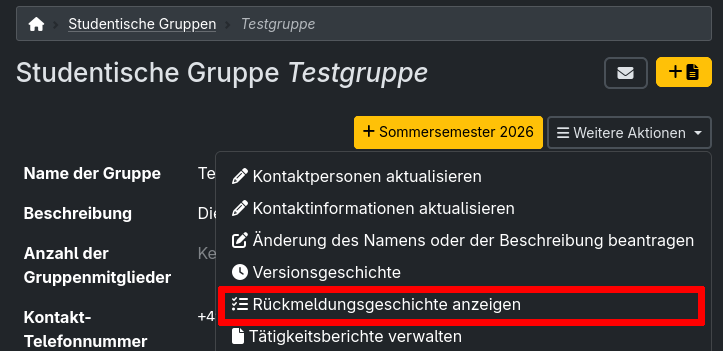
You can access an overview of all the registration requests your group has submitted over the past semesters via the menu on your student group’s details page: